MDDB · AI-native document database
The Knowledge Base
Your AI Agent Needs
Built-in MCP server, vector search, RAG, and hybrid retrieval. Plugs into Claude, ChatGPT, Cursor, Windsurf, and any MCP client — single ~28MB binary, zero config
Why MDDB? #
One binary. Every protocol. AI-native from day one.
MDDB is an AI-native embedded document database written in Go, using BoltDB for storage. It accepts Markdown, plain text, HTML, PDF, DOCX, ODT, RTF, LaTeX, YAML, and Wikipedia XML dump documents, auto-converting everything to Markdown. All documents are stored with full revision history.
Core capabilities
- Built-in MCP server with 81 tools — connects to Claude, Cursor, Windsurf, ChatGPT, Ollama, DeepSeek, Manus via stdio and HTTP transport
- Geospatial search: R-tree and geohash indexes, radius and bounding-box queries, composable with full-text and vector search, optional postcode lookup
- Transport options: TCP host:port or Unix Domain Socket (
unix:/path.sock) for zero-network local deployments (PHP-FPM sidecars, cron, same-host panel) - TLS and mutual TLS (mTLS): user-supplied server cert/key, optional client CA bundle for certificate-based client authentication (MDDB_TLS_CLIENT_CA)
- Vector/semantic search with 7 index algorithms: Flat (exact), HNSW, IVF, PQ, OPQ, SQ, BQ — supports OpenAI, Ollama, Cohere, Voyage AI embeddings + per-collection int8/int4 quantization (4-8x compression)
- Full-text search with 7 modes (simple, boolean, phrase, wildcard, proximity, range, fuzzy), TF-IDF, BM25, BM25F, PMISparse scoring, multi-language stemming (18 languages), typo tolerance, metadata pre-filtering
- Hybrid search combining sparse (BM25) and dense (vector) with alpha blending or Reciprocal Rank Fusion
- Zero-shot document classification using embedding cosine similarity
- Custom MCP tools defined in YAML for domain-specific AI workflows
- RAG pipeline: auto-embed on ingest, semantic retrieval, MCP exposure to LLMs
- Memory RAG: conversational memory with session management, semantic recall, and summarization
- Multi-protocol: HTTP/JSON REST API, gRPC/Protobuf, GraphQL, WebSocket streaming (via mddb-chat), MCP (Streamable HTTP / SSE / stdio)
- Multi-format upload: .md, .txt, .html, .pdf, .docx, .odt, .rtf, .tex, .yaml with auto-conversion to Markdown
- Wikipedia XML dump import: stream multi-GB MediaWiki dumps with wikitext-to-Markdown conversion, namespace filtering, batch processing
- URL import: fetch and store documents from any URL
- Document TTL with auto-expiry and background cleanup
- Full revision history for every document
- JWT authentication and RBAC authorization (opt-in)
- Compliance-first (v2.9.15+): ISO 27001 / SOC 2 hardening built-in — audit log, AES-256-GCM at-rest encryption, HTTP+gRPC rate limiter, incident webhooks, and a single
MDDB_PRODUCTION=trueswitch that refuses to boot without every control in place - Leader-follower replication with binlog streaming
- Automation: triggers, crons, webhooks, sentiment analysis, template variables
- Multi-language support: same document key, multiple locales
- Prometheus metrics and Grafana dashboard support
- ~28MB single binary, embedded BoltDB, zero external dependencies
- Docker image: ~33MB Alpine-based with health checks
- Aggregations: metadata facets (value counts) and date histograms with optional pre-filtering
- Per-collection storage backends: BoltDB (default), in-memory (ephemeral), S3/MinIO — configurable via API and web panel
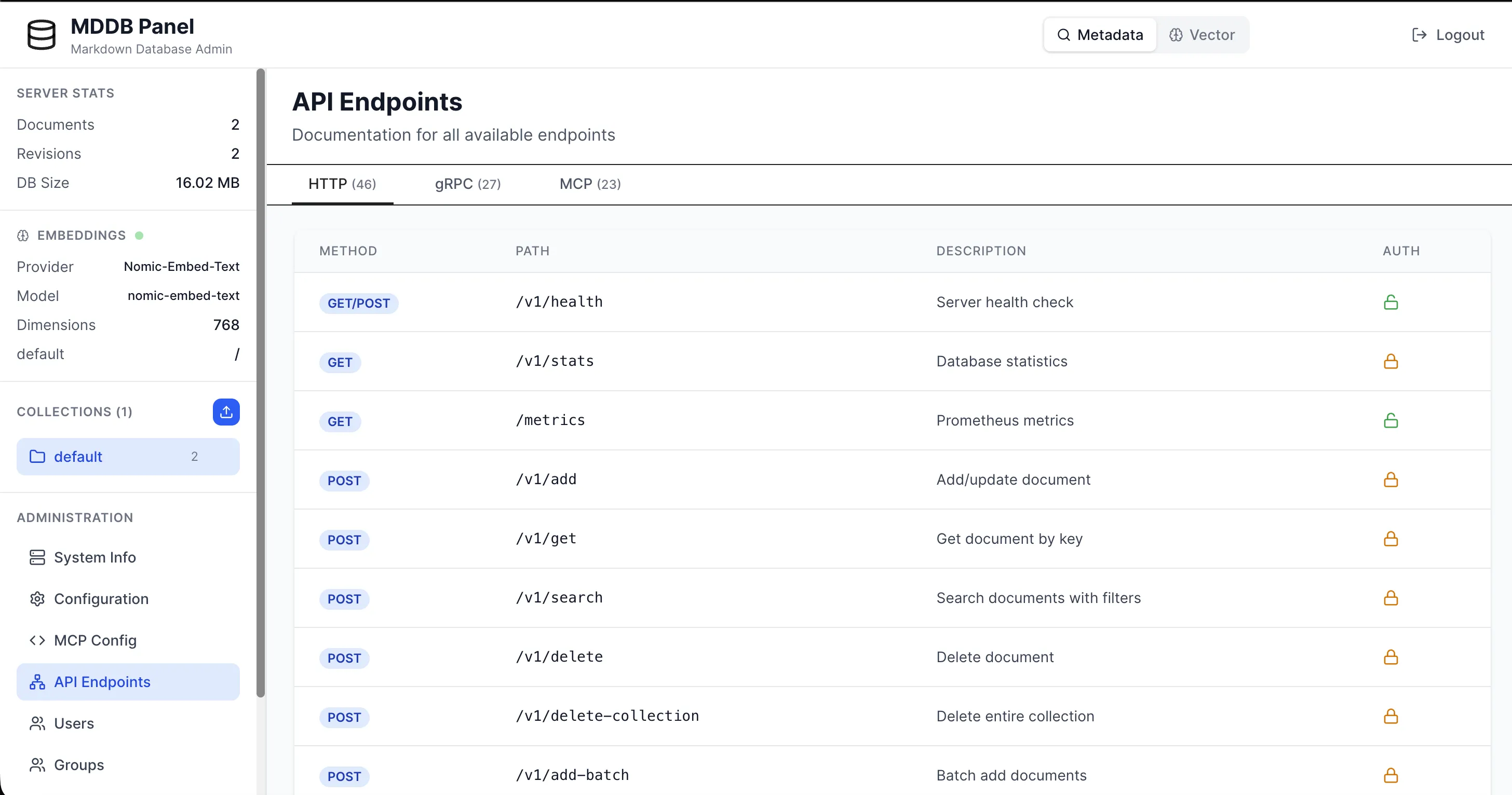
- Web admin panel (React-based) with REST/GraphQL API toggle
- PHP and Python client libraries
81 Built-in MCP Tools
MCP 2025-11-25 compliant. Tool annotations for auto-approve, 5 built-in prompts, completion, structured output, logging. Three transports: stdio, Streamable HTTP, SSE.
Hybrid Search Engine
Full-text with 7 search modes (simple, boolean, phrase, wildcard, proximity, range, fuzzy) + vector search with 7 index types. Multi-language stemming for 18 languages. Combine with alpha blending or Reciprocal Rank Fusion. Metadata pre-filtering, typo tolerance.
Multi-Protocol Access
REST for easy debugging, gRPC for high-throughput pipelines, GraphQL for flexible
frontend queries, and WebSocket streaming via mddb-chat for LLM chat
pipelines. All endpoints, one stack.
Multi-Format Pipeline
Upload .md, .txt, .html, .pdf, .docx, .odt, .rtf, .tex, .yaml, import from any URL, or stream Wikipedia XML dumps (.xml.bz2). Everything auto-converts to Markdown. Background embedding worker indexes documents as they arrive.
🎨 Web Admin Panel
Modern React-based UI for managing documents, users, and search with REST/GraphQL API toggle
Quick Start #
# Run MDDB server
docker run -d \
  -p 11023:11023 \
  -p 11024:11024 \
  -v mddb-data:/data \
  tradik/mddb:latest

# Test the API
curl http://localhost:11023/health# Clone repository
git clone https://github.com/tradik/mddb.git
cd mddb
# Start all services (MDDB + Panel + MCP)
make docker-up
# Services available:
# - MDDB HTTP: http://localhost:11023
# - MDDB gRPC: localhost:11024
# - Web Panel: http://localhost:3000
# - MCP Server: http://localhost:9000# Download binary
wget https://github.com/tradik/mddb/releases/download/v2.11.4/mddbd-v2.11.4-linux-amd64.tar.gz
tar -xzf mddbd-v2.11.4-linux-amd64.tar.gz
# Run server
./mddbd
# Server starts on http://localhost:11023# Clone repository
git clone https://github.com/tradik/mddb.git
cd mddb
# Build
make build
# Run
./bin/mddbdDownload #
Latest Release
Released: 31 July 2026
Package Managers
🐳 Docker All platforms
docker pull tradik/mddb:latest
docker pull tradik/mddb:2.13.0What's New in v2.13.0
- Native multi-tenancy — tenant namespace isolation for collections, enforced centrally so HTTP, gRPC, GraphQL and MCP all inherit it; tenant users can never hold the global admin role and single-tenant deployments need zero changes.
- Retrieval modes for vector search —
retrievalMode:
                    parent | chunk | window
returns whole documents, the exact matching passage (chunkIndex+chunkText), or the passage with surrounding context — precise prompts for RAG. - MMR result diversification —
mmr: truereranks with Maximal Marginal Relevance so near-duplicate documents stop crowding out distinct ones;mmrLambdabalances relevance vs diversity. - Disk-only vectors (low-memory mode) —
diskOnlyVectors: truekeeps only quantized vectors in RAM (~4× less with int8, ~8× with int4) while full-precision vectors stay on disk for exact two-phase rescoring. - Vector space explorer —
/v1/vector-projectioncomputes a server-side 2D PCA projection of a collection's embeddings and the panel visualizes clusters, outliers and query placement. - arm64 SIMD restored — NEON/SME hardware acceleration for vector math builds and links again on Apple Silicon and ARM servers.
v2.9.12 highlights
- Per-query boost / demote for FTS and Hybrid search — attach a
boostmap keyed by"metaKey:metaValue"to multiply or divide matching documents' scores at query time. Positive values boost (5.0= 5×), negative values demote (-2.0= ½×). Combines multiplicatively across matches with a0.001floor. No reindex. Wired through HTTP, gRPC, MCP tools and the web panel (collapsible UI in both FTS and Hybrid views). - Async bulk ingest with job tracking — four new endpoints under
/v1/bulk-ingest-job*for long-running imports: submit returns HTTP202with a job ID, GET polls status, DELETE cancels pending, list returns all jobs newest-first. Single FIFO worker drains 500-doc chunks; orphan jobs from a crashed run are flipped tofailedon startup. OptionalcallbackUrlfires a webhook on completion. Four companion MCP tools (bulk_ingest_submit/_status/_list/_cancel). - Prefix autocomplete —
GET /v1/autocompletereturns top-N terms starting with the given prefix, ranked by document frequency. Scans the existing FTS inverted index (no new storage), with optional field scoping viafieldand a 10 000-entry scan cap to keep pathological prefixes fast. The FTS search input in the panel gains a debounced (150 ms) suggestion dropdown with doc-count badges. MCPautocompletetool mirrors the HTTP API. - Proto backwards-compatible bump —
FTSRequestgets fieldboost = 8andHybridSearchRequestgets fieldboost = 15. Regenerated viabuffor Go, Python, Node.js and PHP. Pre-2.9.12 clients keep working — they simply don't set the new field. - Coverage >90% on the new surface —
fts_boost.goat 100% across all six functions;fts_autocomplete.go~90% average;bulk_ingest_job.go~87% average (shutdown-only paths untested by design).
Documentation #
Getting Started
- Quick StartGet up and running in 5 minutes
- API DocumentationInteractiveSwagger UI for all endpoints
- OpenAPI SpecMachine-readable API specification
- ExamplesCode examples and patterns
- Use CasesWhat people build with MDDB
- Docker GuideContainer deployment
- Docker Hub ImageTags, volumes and what ships in the image
- ArchitectureSystem design and internals
Search & AI
- Search AlgorithmsUpdatedFTS + vector, retrieval modes (parent/chunk/window), MMR diversification
- Vector QuantizationNewint8/int4 storage + disk-only low-memory mode
- PMISparseBM25 + PPMI query expansion (Tradik Limited)
- GeosearchR-tree + geohash radius/bbox queries
- RAG PipelineWordPress → MDDB → LLM guide
- LLM ConnectionsClaude, ChatGPT, Ollama, DeepSeek, Manus, Bielik.ai
- MCP Server ConfigAPI keys, rate limits, logging, access modes
- Custom MCP ToolsYAML-defined website-specific AI tools
- IntegrationsDocling, Langflow, OpenSearch pipelines
Security & Operations
- Multi-TenancyNewNamespace isolation per tenant across HTTP/gRPC/GraphQL/MCP
- Authentication & RBACJWT tokens, API keys, role-based access
- Auth Quick Start5-minute authentication setup
- ReplicationLeader-follower, Docker Compose, monitoring
- Telemetry & MonitoringPrometheus metrics, Grafana dashboards
- Health ChecksDocker & Kubernetes monitoring
- License AuditDependency license compliance (Trivy)
- Homepage AuditAccessibility, metadata and performance findings
Protocols & Advanced
- gRPC GuideHigh-performance protocol
- Schema ValidationEnforce metadata structure per collection
- AutomationsTriggers, crons, webhooks, sentiment
- Temporal TrackingEvent history, hot-docs leaderboard, activity histograms
- Spell CorrectionSymSpell FTS corrections, custom dictionaries
- WordPress AI AgentBuild a chatbot for your WP site
- Chat WidgetEmbeddable AI chatbot powered by MDDB
Code Examples #
# Add document with TTL (expires in 1 hour)
curl -X POST http://localhost:11023/v1/add \
  -H "Content-Type: application/json" \
  -d '{
    "collection": "blog",
    "key": "hello-world",
    "lang": "en_US",
    "ttl": 3600,
    "meta": {
      "category": ["tutorial"],
      "author": ["John Doe"]
    },
    "contentMd": "# Hello World\n\nWelcome to MDDB!"
  }'

# Import directly from URL
curl -X POST http://localhost:11023/v1/import-url \
-d '{"collection":"docs", "url":"https://example.com/guide.md", "lang":"en_US"}'# Semantic search - flat (exact, default)
curl -X POST http://localhost:11023/v1/vector-search \
-H "Content-Type: application/json" \
-d '{
"collection": "kb",
"query": "how do I cancel my subscription?",
"topK": 5,
"threshold": 0.7,
"includeContent": true
}'
# HNSW - fast approximate nearest neighbor
curl -X POST http://localhost:11023/v1/vector-search \
-d '{"collection":"kb", "query":"refund", "topK":5, "algorithm":"hnsw"}'
# IVF - clustered search for large collections
curl -X POST http://localhost:11023/v1/vector-search \
-d '{"collection":"kb", "query":"refund", "topK":5, "algorithm":"ivf"}'
# PQ - compressed, memory-efficient search
curl -X POST http://localhost:11023/v1/vector-search \
-d '{"collection":"kb", "query":"refund", "topK":5, "algorithm":"pq"}'# Simple search with BM25 scoring
curl -X POST http://localhost:11023/v1/fts \
-H "Content-Type: application/json" \
-d '{
"collection": "blog",
"query": "markdown database tutorial",
"limit": 10,
"algorithm": "bm25"
}'
# Boolean search (AND, OR, NOT, +required, -excluded)
curl -X POST http://localhost:11023/v1/fts \
-H "Content-Type: application/json" \
-d '{
"collection": "blog",
"query": "rust AND performance NOT garbage",
"mode": "boolean"
}'
# Phrase search — exact word sequence
curl -X POST http://localhost:11023/v1/fts \
-H "Content-Type: application/json" \
-d '{
"collection": "blog",
"query": "\"machine learning\"",
"mode": "phrase"
}'
# Proximity search — terms within 5 words
curl -X POST http://localhost:11023/v1/fts \
-H "Content-Type: application/json" \
-d '{
"collection": "blog",
"query": "\"database performance\"~5",
"mode": "proximity",
"distance": 5
}'curl -X POST http://localhost:11023/v1/search \
-H "Content-Type: application/json" \
-d '{
"collection": "blog",
"filterMeta": {
"category": ["tutorial"],
"status": ["published"]
},
"sort": "updatedAt",
"limit": 10
}'from mddb import MDDB
# TCP connection
db = MDDB.connect('localhost:11023', 'write').collection('kb')
# Unix Domain Socket (MDDB 2.9.14+, zero-network local transport)
# db = MDDB.connect('unix:/tmp/mddb.sock', 'write').collection('kb')
# Add document
db.add('faq', 'en_US', {'category': ['billing']}, '# Billing FAQ\n\nCancel in Settings.')
# Vector search (RAG pipeline step 1)
results = db.vector_search('how to cancel?', top_k=3, include_content=True)
# Full-text search
results = db.fts_search('billing refund', limit=10)
# Webhooks
db.register_webhook('https://app.com/hook', ['doc.added'], 'kb')
# Import from URL
db.import_url('https://example.com/docs.md', 'en_US')
# TTL
db.set_ttl('temp-key', 'en', 3600) # expires in 1h<?php
require_once 'mddb.php';
// TCP connection
$db = mddb::connect('localhost:11023', 'write');
// Unix Domain Socket (MDDB 2.9.14+)
// $db = mddb::connect('unix:/tmp/mddb.sock', 'write');
// Add document
$db->collection('blog')->add('hello', 'en_US', ['category' => ['tutorial']], '# Hello');
// Vector search
$results = $db->collection('kb')->vectorSearch('cancel subscription', 5, 0.7, true);
// Full-text search
$results = $db->collection('blog')->ftsSearch('database tutorial', 10);
// Webhooks
$db->registerWebhook('https://app.com/hook', ['doc.added', 'doc.updated']);
// Import from URL
$db->collection('docs')->importUrl('https://example.com/post.md', 'en_US');
// TTL
$db->collection('cache')->setTtl('temp', 'en', 3600);# Docker (Easiest) - for Windsurf / Claude Desktop
# Configure ~/.windsurf/mcp.json:
{
"mcpServers": {
"mddb": {
"command": "docker",
"args": [
"run", "-i", "--rm", "--network", "host",
"-e", "MDDB_GRPC_ADDRESS=localhost:11024",
"-e", "MDDB_REST_BASE_URL=http://localhost:11023",
"-e", "MDDB_MCP_STDIO=true",
"tradik/mddb:latest"
]
}
}
}
# MCP provides 81 built-in tools including:
# - add_document, search_documents, semantic_search
# - full_text_search, hybrid_search, cross_search
# - classify_document, find_duplicates
# - geo_search, geo_within, geo_encode, geo_decode, geo_stats
# - automation, webhooks, schemas, backups
# - collection config, revisions, aggregate, and more🔄 Leader-Follower Replication #
Scale reads horizontally with binlog-based streaming replication. A single leader handles writes and streams transactions in real-time to read-only followers via gRPC.